Disable back button

On the internal main page, create “log-off” or “exit” link. In code behind of the same page write sub to disable browser back button, like this:

[ Control-Panel.aspx.vb ]

Protected Overloads Overrides Sub OnPreRender(ByVal e As EventArgs)


        '/ disable back button

        MyBase.OnPreRender(e)

        Dim strDisAbleBackButton As String

        strDisAbleBackButton = "<script language='javascript'>" & vbLf

        strDisAbleBackButton += "window.history.forward(1);" & vbLf

        strDisAbleBackButton += vbLf & "</script>"

        ClientScript.RegisterClientScriptBlock(Me.Page.[GetType](), "clientScript", strDisAbleBackButton)

    End Sub

In form section of the Close-Session.aspx write this code:

[ Close-Session.aspx ]


form id=" form1runat=" server ">

    <%

        Session.Abandon()

        Session.Remove( "Name" )

        Response.Redirect( "Your-Page.aspx" )

        %>

    </form

Once you kill the session and redirect user to different page, user will not be able to use back button to go to previous page, and in order to access protected pages user will need to login again and create new session.
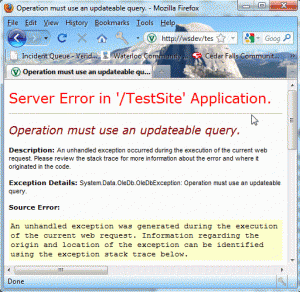
Operation must use an updateable query

Server Error in ‘/TestSite’ Application

Operation must use an updateable query.

Issue:

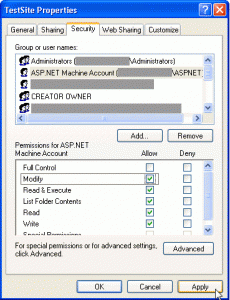
Denied right to ASP.NET Machine Account to modify access db

Resolution

– Make sure Internet Guest Account has a read/write rights
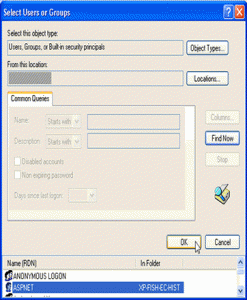
– Open application folder properties and add ASP.NET Machine Account if does not exist – Permit the ASP.NET Machine Account to modify folder content
– Restart IIS and reload the page

Simple Javascript Calculator

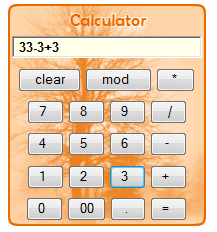
This is simple javascript calculator

<html>

<head>
<title>Calculator</title>

<script language=”javascript”>
var inputstring=” ”
function updatestring(value)
{
inputstring += value;
document.calculator.input.value=inputstring;
}
</script>
<style type=”text/css”>
#tb-lo {
/*background: url(Calc-bg.png); */
height: 222px;
width: 198px;
padding: 2px 2px 2px 2px;
background-image: url(Calc-bg.png);
background-repeat: no-repeat;
}
#td-key {
text-align: center;
}
</style>
</head>

<body>
<form name=”calculator”>
<table id=”tb-lo”>
<tr>
<td>&nbsp;</td>
</tr>
<tr>
<td id=”td-key”>
<input type=”text” name=”input” maxlength=”25″ size=”26″ style=”background-color:#FFFFEA; font-family:Arial, Helvetica, sans-serif; font-weight: 600;”>
</td>
</tr>
<tr>
<td id=”td-key”>
<input type=”button” value=”  clear  ” onclick=”input.value=’ ‘;inputstring=’ ‘ “>
<input type=”button” value=”  mod    ” onclick=”updatestring(‘%’)”>
<input type=”button” value=”   *    ” onclick=”updatestring(‘*’)”>
</td>
</tr>
<tr>
<td id=”td-key”>
<input type=”button” value=”  7    ” onclick=”updatestring(‘7’)”>
<input type=”button” value=”  8    ” onclick=”updatestring(‘8’)”>
<input type=”button” value=”  9    ” onclick=”updatestring(‘9’)”>
<input type=”button” value=”    /   ” onclick=”updatestring(‘/’)”>
</td>
</tr>
<tr>
<td id=”td-key”>
<input type=”button” value=”  4    ” onclick=”updatestring(‘4’)”>
<input type=”button” value=”  5    ” onclick=”updatestring(‘5’)”>
<input type=”button” value=”  6    ” onclick=”updatestring(‘6’)”>
<input type=”button” value=”   –    ” onclick=”updatestring(‘-‘)”>
</td>
</tr>
<tr>
<td id=”td-key”>
<input type=”button” value=”  1    ” onclick=”updatestring(‘1’)”>
<input type=”button” value=”  2    ” onclick=”updatestring(‘2’)”>
<input type=”button” value=”  3    ” onclick=”updatestring(‘3’)”>
<input type=”button” value=”  +    ” onclick=”updatestring(‘+’)”>
</td>
</tr>
<tr>
<td id=”td-key”>
<input type=”button” value=”  0    ” onclick=”updatestring(‘0′)”>
<input type=”button” value=”  00  ” onclick=”updatestring(’00’)”>
<input type=”button” value=”   .    ” onclick=”updatestring(‘.’)”>
<input type=”button” value=”  =    ” onclick=”input.value=eval(inputstring);”>
</td>
</tr>
</table>
</form>
</body>
</html>