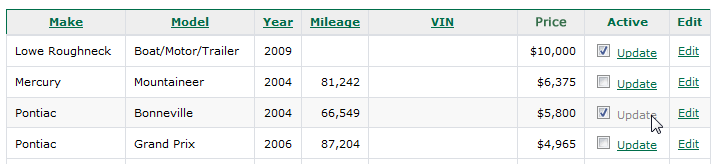
Here is simple record query inside the datagrid. I was looking for this solution which does not require code behind.
Access DB structure
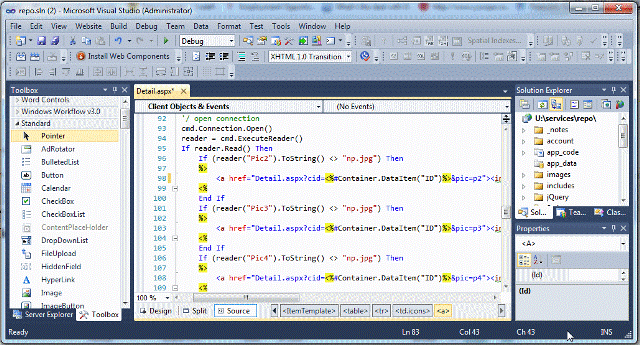
Detail.aspx page code:
<form id=“form1” runat=“server”>
<div>
<asp:GridView ID=”GridView1″ runat=”server” AutoGenerateColumns=”False”
DataKeyNames=”ID” DataSourceID=”DetailView” GridLines=”None”>
<Columns>
<asp:TemplateField>
<ItemTemplate>
<table width=”660px” border=”0″ cellpadding=”0″ cellspacing=”0″>
<tr>
<td colspan=”4″>
<a href=”Detail.aspx?cid=<%#Container.DataItem(“ID”)%>&pic=p1″><img src=”images/<%# Container.DataItem(“Pic1″)%>” width=”75px” height=”54px” border=”0″/></a>
<%
Dim vid As String
vid = Request.QueryString( “cid” )
‘/ access db connection – MS Access 2007/10 driver * you can define your own sql connection
Dim ConnDB As New OleDbConnection(“Provider=Microsoft.ACE.OLEDB.12.0;Data Source=” & Server.MapPath(“/my_folder/my.mdb”))
Dim cmd As New OleDbCommand(“SELECT * FROM MyCars WHERE (ID = ” & vid & “);”, ConnDB)
Dim reader As OleDbDataReader
‘/ open connection
cmd.Connection.Open()
reader = cmd.ExecuteReader()
If reader.Read() Then
If (reader(“Pic2”).ToString() <> “np.jpg”) Then
%>
<a href=”Detail.aspx?cid=<%#Container.DataItem(“ID”)%>&pic=p2″><img src=”images/<%# Container.DataItem(“Pic2”)%>” width=”75px” height=”54px” border=”0″/></a>
<%
End If
If (reader(“Pic3”).ToString() <> “np.jpg”) Then
%>
<a href=”Detail.aspx?cid=<%#Container.DataItem(“ID”)%>&pic=p3″><img src=”images/<%# Container.DataItem(“Pic3”)%>” width=”75px” height=”54px” border=”0″/></a>
<%
End If
If (reader(“Pic4”).ToString() <> “np.jpg”) Then
%>
<a href=”Detail.aspx?cid=<%#Container.DataItem(“ID”)%>&pic=p4″><img src=”images/<%# Container.DataItem(“Pic4”)%>” width=”75px” height=”54px” border=”0″/></a>
<%
End If
If (reader(“Pic5”).ToString() <> “np.jpg”) Then
%>
<a href=”Detail.aspx?cid=<%#Container.DataItem(“ID”)%>&pic=p5″><img src=”images/<%# Container.DataItem(“Pic5”)%>” width=”75px” height=”54px” border=”0″/></a>
<%
End If
If (reader(“Pic6”).ToString() <> “np.jpg”) Then
%>
<a href=”Detail.aspx?cid=<%#Container.DataItem(“ID”)%>&pic=p6″><img src=”images/<%# Container.DataItem(“Pic6”)%>” width=”75px” height=”54px” border=”0″/></a>
<%
End If
If (reader(“Pic7”).ToString() <> “np.jpg”) Then
%>
<a href=”Detail.aspx?cid=<%#Container.DataItem(“ID”)%>&pic=p7″><img src=”images/<%# Container.DataItem(“Pic7”)%>” width=”75px” height=”54px” border=”0″/></a>
<%
End If
If (reader(“Pic8”).ToString() <> “np.jpg”) Then
%>
<a href=”Detail.aspx?cid=<%#Container.DataItem(“ID”)%>&pic=p8″><img src=”images/<%# Container.DataItem(“Pic8”)%>” width=”75px” height=”54px” border=”0″/></a>
<%
End If
End If
cmd.Connection.Close()
%>
</td>
</tr>
<tr>
<td><span>Year:</span></td><td><%# Container.DataItem(“vYear”)%></td>
<td><span>Exterior:</span></td><td><%# Container.DataItem(“Exterior”)%></td>
</tr>
<tr>
<td><span>Make:</span></td><td><%# Container.DataItem(“Make”)%></td>
<td><span>Interior:</span></td><td><%# Container.DataItem(“Interior”)%></td>
</tr>
<tr>
<td><span>Model:</span></td><td><%# Container.DataItem(“Model”)%></td>
<td><span>Starting Bid:</span></td><td><%# DataBinder.Eval(Container.DataItem, “sFloor”, “{0:c0}”) %></td>
</tr>
<tr>
<td><span>Mileage:</span></td><td><%# DataBinder.Eval(Container.DataItem, “Mileage”, “{0:#,##0} mi”)%></td>
<td><span>VIN:</span></td><td><%# Container.DataItem(“VIN”)%></td>
</tr>
</table>
</ItemTemplate>
</asp:TemplateField>
</Columns>
</asp:GridView>
<asp:AccessDataSource ID=”DetailView” runat=”server” DataFile=”/my_folder/mydb.mdb”
SelectCommand=”SELECT * FROM [MyCars] WHERE ([ID] = ?)”>
<SelectParameters>
<asp:QueryStringParameter Name=”ID” QueryStringField=”cid” Type=”Int32″ />
</SelectParameters>
</asp:AccessDataSource>
</div>
</form>