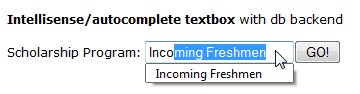
The code is initial designed by Mircho Mirev [ momche.net ]. I’ve enhanced this script so instead of array of static data the text-box auto-complete uses database back end.
Default.asp
<%@LANGUAGE=”VBSCRIPT” CODEPAGE=”65001″%>
<!DOCTYPE HTML PUBLIC “-//W3C//DTD HTML 4.01 Transitional//EN” “http://www.w3.org/TR/html4/loose.dtd”>
<html>
<head>
<meta http-equiv=”Content-Type” content=”text/html; charset=utf-8″>
<title>Intellisense Example</title>
<SCRIPT language=”JavaScript” src=”moautocomplete.js”></SCRIPT>
</head>
<body style=”font-family: Verdana, Geneva, sans-serif; font-size: 12px;”>
<div style=”padding-top: 200px; font-family: Verdana; font-size: 12px;”>
<%
‘ Set up one data series for each category of product
Set objConn = Server.CreateObject(“ADODB.Connection”)
dbPath = Server.MapPath(“Intellisense.accdb”)
objConn.Open “Provider=Microsoft.ACE.OLEDB.12.0;Data Source=” & dbPath, “”, “”
SET objRS = Server.CreateObject(“ADODB.RecordSet”)
objRS.Open “SELECT * FROM Applicants ORDER BY sProgram”,objConn,1,2
%>
<form method=”get”>
<b>Intellisense/autocomplete textbox</b> with db backend<br /><br />
Scholarship Program: <INPUT id=”program” type=”text” name=”program” autocomplete=”list:
<%
While Not objRS.EOF
Response.Write(objRS(“sProgram”)&”|”)
objRS.MoveNext
WEND
%>”><input type=”submit” id=”submit” value=”GO!”>
</form>
</div>
</body>
</html>
Moautocomplete.js
var cAutocomplete =
{
sDescription : ‘autcomplete class’
}
cAutocomplete.complete = function( hEvent )
{
if( hEvent == null )
{
var hEvent = window.hEvent
}
var hElement = ( hEvent.srcElement ) ? hEvent.srcElement : hEvent.originalTarget
var sAA = hElement.getAttribute( ‘autocomplete’ ).toString()
if( sAA.indexOf( ‘array:’ ) >= 0 )
{
hArr = eval( sAA.substring( 6 ) )
}
else if( sAA.indexOf( ‘list:’ ) >= 0 )
{
hArr = sAA.substring( 5 ).split( ‘|’ )
}
if( hEvent.keyCode == 16 )
{
return
}
var sVal = hElement.value.toLowerCase()
if( hEvent.keyCode == 8 )
{
sVal = sVal.substring( 0, sVal.length – 1 )
}
if( sVal.length < 1 )
{
return
}
for( var nI = 0; nI < hArr.length; nI++ )
{
sMonth = hArr[ nI ]
nIdx = sMonth.toLowerCase().indexOf( sVal, 0 )
if( nIdx == 0 && sMonth.length > sVal.length )
{
hElement.value = hArr[ nI ]
if( hElement.createTextRange )
{
hRange = hElement.createTextRange()
hRange.findText( hArr[ nI ].substr( sVal.length ) )
hRange.select()
}
else
{
hElement.setSelectionRange( sVal.length, sMonth.length )
}
return
}
}
}
cAutocomplete.init = function()
{
var nI = 0
var aInputs = document.getElementsByTagName( ‘INPUT’ )
for( var nI = 0; nI < aInputs.length; nI ++ )
{
if( aInputs[ nI ].type.toLowerCase() == ‘text’ )
{
var sLangAtt = aInputs[ nI ].getAttribute( ‘autocomplete’ )
if( sLangAtt )
{
if( document.attachEvent )
{
aInputs[ nI ].attachEvent( ‘onkeyup’, cAutocomplete.complete )
}
else if( document.addEventListener )
{
aInputs[ nI ].addEventListener( ‘keyup’, cAutocomplete.complete, false )
}
}
}
}
}
if( window.attachEvent )
{
window.attachEvent( ‘onload’, cAutocomplete.init )
}
else if( window.addEventListener )
{
window.addEventListener( ‘load’, cAutocomplete.init, false )
}