Description:
ASP.NET Toolbox calendar control which use control parameter to query db records and display event(s) on calander item selection change. This is suitable for deisplaying events on PostBack call on the same page.
Elements:
- Events.mdb / or MS SQL
- Web.config
- Month-2.aspx
- Month-2.aspx.vb
- Dtgrid.css
Method:
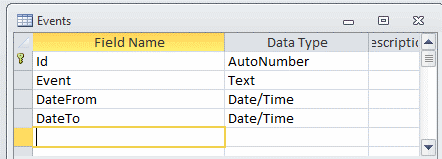
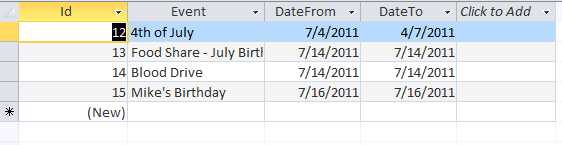
- Create table Events (Id [primary key – AutoNumber], Event [Text], DateFrom [Date/Time], DateTo[Date/Time].
- Enter some data in the table
 |
 |
- Create/re-write web.config file (download web.config file here)
- Add New Item and name it Month-2.aspx or whatever you like
- Import dtgrig.css (downolad dtgrid.css file here)
- Drag calendar control from toolbox to designer
- Double click designer and in code behind create two subs: Page_Load and Calender1_SelectionChanged
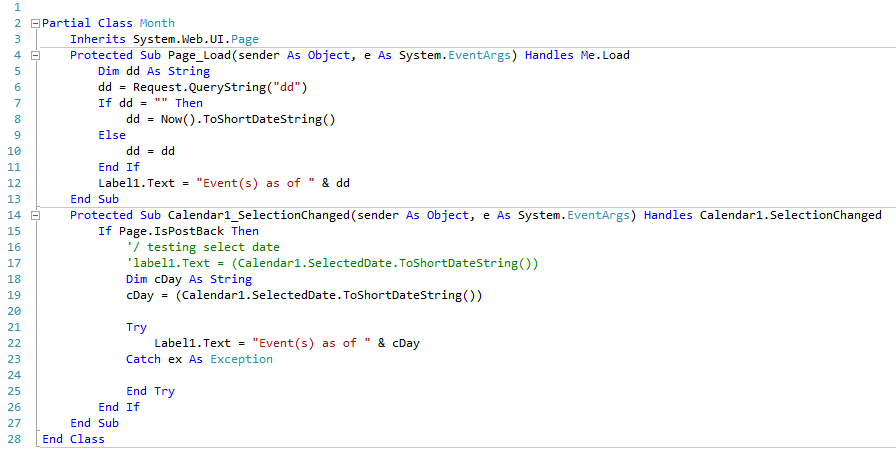
- Drag “Events” table from Server Explorer to designer; Configure Data Source WHERE DateFrom = Control – Calendar1 and add it to a SQL expression.
- Configure css property for your calendar and grid view and you are good to go.